
How to Start a Website (Step-by-Step for Beginners)
Your simple guide to building your online business foundation
Starting a website is one of the most important steps in building an online business. It’s your space on the internet — where your content lives, where people find you, and where you earn income.
The good news?
You don’t need to be tech-savvy to do this.
Once you understand how websites, hosting, and domains work, everything becomes a lot simpler.
What You’ll Learn
Website Basics
You’ll learn how websites actually work — without the confusion.
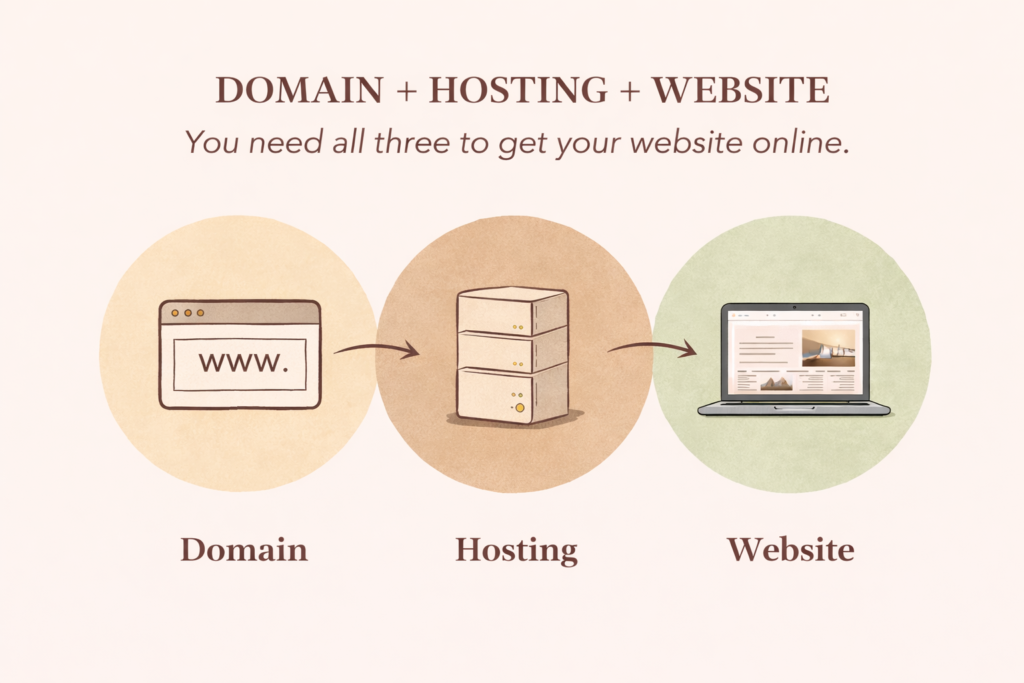
We’ll break down the three key parts every website needs:
- Domains (your website name)
- Hosting (where your website lives)
- Website platforms like WordPress
By the end, you’ll understand how everything connects together and feel confident setting up your own site from scratch.
Platform Options
Not all websites are built the same — and choosing the right platform makes everything easier.
You’ll learn the difference between:
- WordPress (best for blogging & affiliate marketing)
- Shopify (best for selling products & e-commerce)
- Simple website builders (good for quick setups)
This will help you choose the right path based on your goals — whether that’s building a blog, an online business, or a store.
Content & SEO
Your website only works if people can find it — and that’s where content and SEO come in.
You’ll learn how to:
- Create helpful blog content that attracts visitors
- Use keywords to show up on Google Structure your posts so they’re easy to read and rank
- Optimise titles, images, and descriptions
This is what turns your website into something that actually grows over time.
Step 1: Understand How a Website Works
One of the easiest ways to understand how a website works is to picture it like building a home.
Everything has a role — and once you see how they connect, it becomes much simpler.
- Domain = Your address (example: yourwebsite.com)
- Hosting = The land your house sits on
- Website (WordPress) = The actual house you build
All three work together to create your online presence.
Without hosting, your website has nowhere to live
Without a domain, people can’t find you
Step 2: Choose Your Website Type
Choosing your website type depends on how you want to make money online and what suits your goals. If you enjoy creating content and want to recommend products, affiliate marketing is a great option that grows over time. If you’d rather sell products directly, e-commerce allows you to offer your own physical or digital items with full control over your brand. Print on demand sits in between, letting you sell custom-designed products without holding inventory or managing shipping. There’s no single “right” choice — you can start with one and expand later as your website grows.
Blogging
Blogging is all about creating helpful content that people are already searching for.
- You write blog posts
- People find them through Google or Pinterest
- You earn through ads or recommendations
This is one of the best ways to build long-term, passive traffic
Affiliate Marketing
Affiliate marketing means recommending products or tools and earning a commission when someone signs up or buys through your link.
- You share helpful content Naturally recommend products Earn a percentage of each sale
This works best when combined with blogging.
Print on Demand
Print on demand lets you sell custom-designed products without holding any stock.
- Create designs (shirts, mugs, etc.)
- A supplier prints and ships the product
- You earn the profit
Low risk, no inventory needed.
E-Commerce
E-commerce is when you sell your own products directly through your website.
- Physical products
- Digital products (ebooks, guides, templates)
- Full control over pricing and branding
This is more hands-on but can scale well.
Key Difference Explained
- Blogging & Affiliate Marketing → Content-first-You attract people first through helpful content, then monetise.
- E-commerce → Product-first-You focus on selling products directly from the start.
What Most People Do– Many successful websites combine both:
- Use blogging to bring traffic
- Use affiliate links or products to make income
This creates a simple but powerful online business model that grows over time.
Step 3: Choose Your Hosting & Platform
Option 1: WordPress + Hosting (Best for Blogging & Affiliate Marketing)
If your goal is to build a website that grows over time — especially through content — this is the best option.
It gives you the freedom to create, customise, and monetise your site exactly how you want.
Recommended For:
- Blogging Affiliate marketing
- Content-based websites
- Building a long-term online business
Why This Is the Best Option
- Full control over your website-You own your site completely — you’re not limited by a platform or restricted features.
- Best for SEO (ranking on Google)-WordPress is built to help your content get found, making it easier to grow traffic over time.
- Easy to add tools and monetisation-You can install plugins for SEO, email lists, speed, and more — plus add affiliate links, ads, or digital products.
- Grows with you-You can start simple and expand later without needing to rebuild your website.
Recommended Hosting Platforms:
- Hostinger – beginner-friendly, affordable, and easy to set up
- Bluehost – well-known, reliable, and widely used
Once you buy hosting, you install WordPress with one click.
How It Works
Once you purchase hosting, you can install WordPress in one click.
From there, you can:
- Choose a theme
- Create pages and blog posts
- Start building your content
Option 2: Shopify (Best for E-commerce & Print on Demand)
If your goal is to sell products — rather than build a content-based website — Shopify is one of the easiest platforms to start with.
It’s designed specifically for online stores, so everything is built around selling.
Recommended For
- Selling physical or digital products
- Print on demand (custom products like clothing, mugs, etc.)
- Dropshipping (selling without holding inventory)
Why Choose Shopify
- Built specifically for selling-Everything is designed for e-commerce — from product pages to checkout.
- Easy product setup-You can quickly add products, pricing, images, and descriptions without needing technical skills.
- Handles payments and checkout-Shopify takes care of payments, order processing, and customer checkout — all in one place.
- Inventory and order management-You can track orders, manage stock, and run your store smoothly from one dashboard.
Downside to Consider
Shopify isn’t built for content in the same way WordPress is.
- Less control over blogging
- Not as strong for SEO-focused content
- Harder to build long-form content strategies
Simple way to decide:
- Want to sell products? → Shopify
- Want to build traffic + content + affiliate income? → WordPress

Simple Rule to Follow
- Want to build content + earn through affiliates? → Go with WordPress
- Want to sell products directly? → Go with Shopify
Step 4: Set Up Your Website (WordPress Basics)
Once you’re inside WordPress, everything is designed to be simple and easy to manage, even as a beginner. You’ll be building your website using a combination of pages for your main structure and posts for your content, while themes control how your site looks and plugins add extra functionality. As you set things up, focus on keeping it clean and simple — you don’t need lots of plugins or complicated designs to start. The goal is to create a solid, easy-to-use foundation that you can build on as your website grows.
What You’ll be using
Once inside WordPress, you’ll see:
- Pages → Static pages (Home, About, Start Here)
- Posts → Blog content
- Plugins → Add features to your site
- Themes → Control design and layout
Important Plugins (Beginner Essentials)
- SEO plugin (for Google ranking)
- Security plugin
- Speed/optimization plugin
- Email signup (Mailchimp integration)
Plugins help your website do more without coding
Step 5: Create Content That Brings Traffic
Before anything else, it’s important to understand that your website only grows when you consistently create helpful content. This is what brings people to your site, builds trust with your audience, and creates opportunities to earn. You don’t need to be perfect or write everything at once — just focus on creating simple, valuable content that answers real questions, and your traffic will build over time.
Without content → no traffic
Without traffic → no income
Types of Content to Create
To grow your website, focus on content that solves problems and answers questions:
- Beginner guides
- Step-by-step posts that explain the basics (perfect for your audience)
- Tutorials
- Show people how to do something clearly and simply
- Product recommendations
- Introduce tools or platforms you use and trust
- Reviews
- Break down pros, cons, and who something is best for
- “How-to” posts
- Answer specific questions people are already searching for
This is the kind of content that ranks on Google and brings consistent traffic.
How to Create Content
Creating content doesn’t have to be complicated — you just need a simple system:
- Write your blog posts in WordPress-This is where all your content lives and gets published
- Use Canva for images-Create clean, branded visuals and Pinterest pins
- Use AI tools to help structure ideas-Great for outlines, headings, and speeding up the writing process
- Get free images from sites like Pexels or Unsplash-Use high-quality, neutral images that match your brand style
Keep it simple You don’t need to create everything at once.
Start with:
- 3–5 helpful blog posts
- Simple, clear topics
- Consistent posting
Over time, your content builds, your traffic grows, and your website starts working for you.
Step 6: Understanding SEO (Very Important)
SEO (Search Engine Optimisation) is what helps your content show up on Google when people are searching for answers. It’s how your blog gets discovered without needing to constantly promote it.
When you optimise your content properly, you make it easier for both Google and your readers to understand what your post is about.
When Writing a Blog Post, Include
Title-Your title should clearly explain what your post is about and include keywords people are searching for. This is one of the biggest factors in getting clicks and ranking on Google.
Meta Description-A short summary (around 140–160 characters) that appears in search results. It helps people decide whether to click on your post.
Tags & Categories-These help organise your content and group similar topics together. They make your website easier to navigate and help search engines understand your site structure.
Images (Very Important for SEO)-When adding images, always include:
- File name → use keywords (before uploading)
- Alt text → describe what the image shows
- Title → optional, but helpful
This helps:
- Google understand your content
- Improve accessibility
- Increase your chances of ranking in search results
Step 7: Build As You Go (Don’t Overcomplicate It)
Starting a website can feel overwhelming, but it doesn’t need to be perfect to work. The most important thing is getting your foundation set up and then building on it over time.
Focus on keeping things simple:
- A clean, easy-to-navigate homepage
- A few helpful blog posts
- A clear, organised structure
You can always improve and refine as you go.
Start With:
- Home page
- About page
- Start Here page
- 3–5 blog posts
This is more than enough to get your website live and ready for traffic.
How It All Works
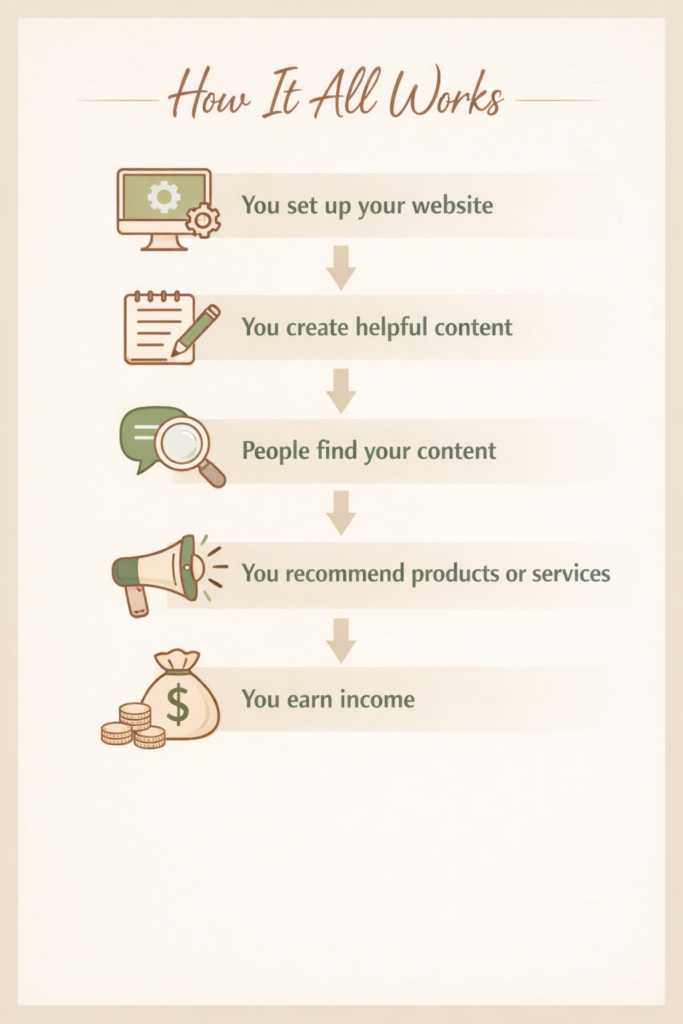
Online business isn’t complicated — it’s a simple system once you understand how the pieces fit together.
You start by setting up your website — your space online where everything lives. Then you create helpful, valuable content that answers questions or solves problems for your audience. Over time, people find your content through search engines or platforms like Pinterest, and begin to trust what you share. From there, you can naturally recommend products or services that support what they’re looking for. When they take action, you earn income.
That’s the full process — simple, but powerful.
You now have everything you need to get started — the rest comes from taking action. Your website will grow as you do, and every post, page, and step forward builds momentum. Start simple, stay consistent, and trust the process.
Want to make things easier?
Explore the tools and resources that can help you build your website, create content, and grow your online business faster.
These are the exact tools beginners can use to get started without feeling overwhelmed.